
GoLogin Comprehensive Review (2026)
1. Product Overview
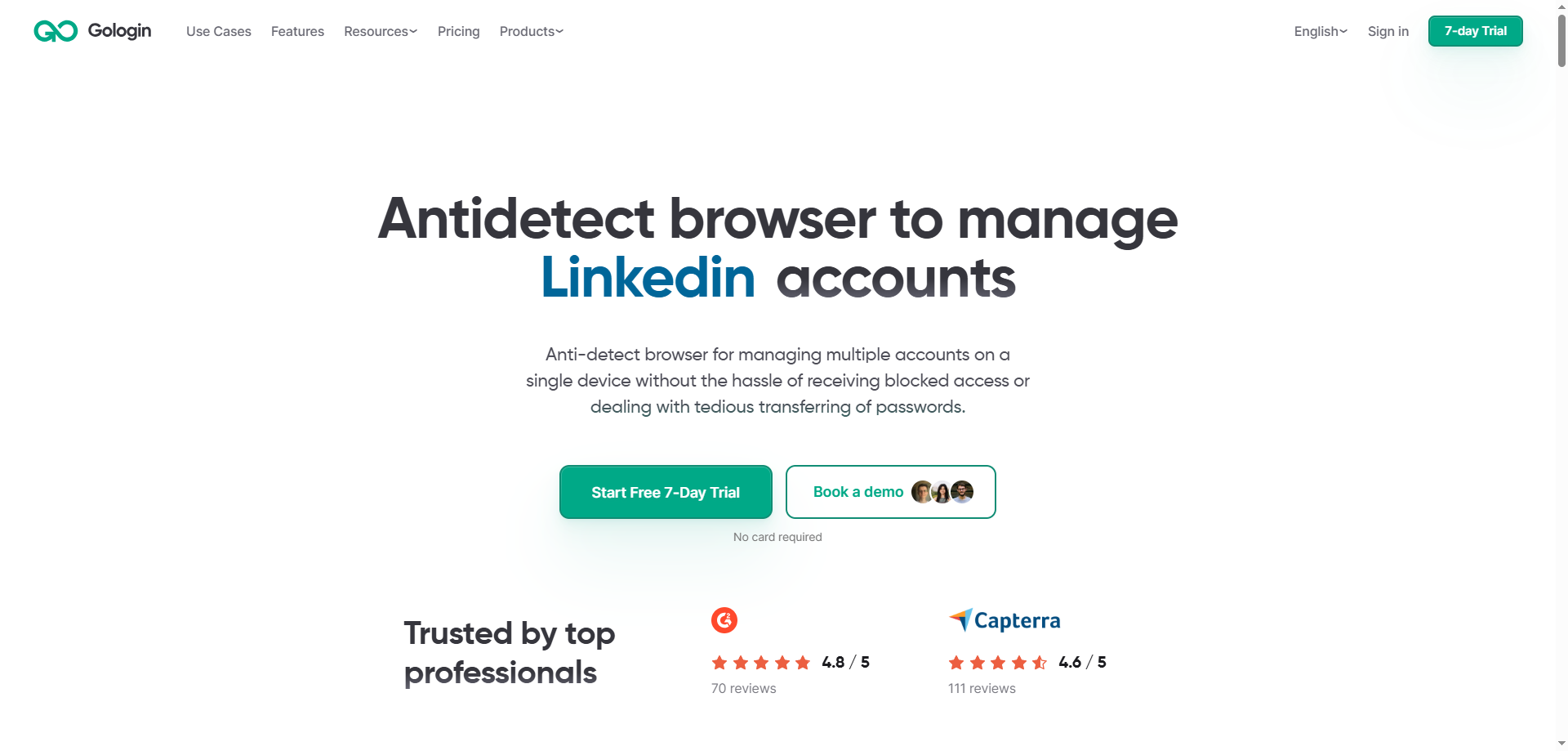
GoLogin is an Antidetect Browser developed based on the Chromium engine. It was launched by a Russian team in 2019, after which the company was registered in the Netherlands and the United States. Its core value lies in helping users manage multiple online accounts safely and efficiently. By generating an independent digital fingerprint for each browser profile, it makes each session appear to come from a different device, thereby effectively avoiding platform association detection and the risk of account bans.
GoLogin offers two ways to use the service: a desktop application (Windows, macOS, and Linux) and a web version. The web version can be accessed through a browser without installation, greatly improving convenience across devices. In 2024–2025, GoLogin was rated by G2 as the “easiest to use” fingerprint browser among similar products.
2. Core Feature Evaluation
1. Browser Fingerprint Management
GoLogin’s core capability is generating an independent digital fingerprint for each profile, covering parameters such as screen resolution, fonts, WebGL, time zone, and language. Users can quickly generate fingerprint configurations through preset-driven settings without manually adjusting every parameter. However, this also means that advanced users cannot fine-tune each fingerprint parameter individually as they can with Multilogin, which limits flexibility to some extent.
2. Multi-Account Management and Team Collaboration
All browser profiles are centrally managed in a table format, allowing users to view and operate them intuitively. For team collaboration, GoLogin supports passwordless profile sharing. Team members can gain account access without knowing the password, effectively reducing security risks.
3. Dual Cloud and Local Modes
GoLogin supports running profiles in the cloud, allowing users to log in to the same account on any device and synchronize all environments and configurations. It also provides an Android app, further expanding mobile work scenarios. However, please note that iOS is not currently supported.
4. API and Automation
GoLogin provides a REST API and supports integration with automation tools such as Selenium and Puppeteer. API request rates vary from 300 RPM to 1,200 RPM depending on the plan. This is an important advantage for users who need web scraping and automated testing.
5. Built-In Proxy
All paid plans include 2 GB of residential proxy traffic, allowing users to use the service directly without purchasing third-party proxies separately. However, some users have reported that the quality of the built-in proxies is not ideal.
6. Cross-Platform Support
GoLogin supports Windows, macOS, Linux, and Android, making it one of the fingerprint browsers with the most comprehensive cross-platform support currently available.
3. Pricing Plans
GoLogin offers a pricing structure consisting of a “Forever Free” plan plus four paid tiers. Annual billing comes with a 50% discount.
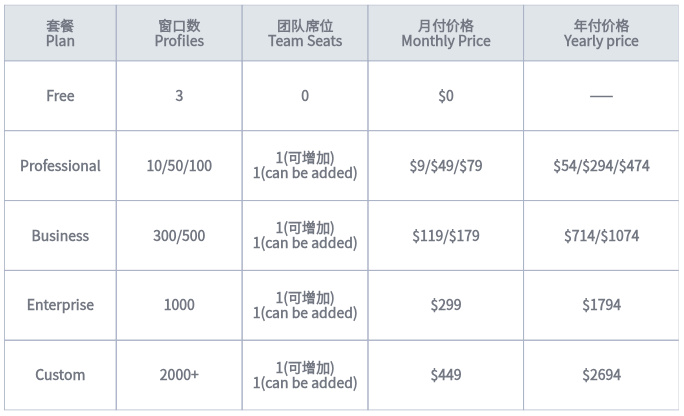
Free plan limitations: The free plan does not support advanced features such as profile sharing, Cookie export/bulk import, bulk profile creation, adding team members, cloud operation, or API access.
Additional notes:
-
All paid plans include 2 GB of residential proxy traffic and 24/7 technical support
-
Business and higher-tier plans can purchase additional team member seats
-
The above pricing applies to new accounts registered after January 2026; existing accounts can contact customer support to migrate
4. Summary of Pros and Cons
1. Advantages
·Affordable pricing: Starting at $4.5/month (annual billing), far lower than competitors such as Multilogin;
·Free forever plan: 3 profiles available free forever, suitable for light use and trial purposes;
·7-day free trial: Experience all paid features without linking a credit card;
·Excellent usability: Rated by G2 as the easiest-to-use fingerprint browser in 2024-2025, with a clean and intuitive interface;
·Comprehensive cross-platform support: Covers Windows, macOS, Linux, and Android;
·Cloud synchronization: Profiles are stored in the cloud, enabling seamless switching across devices;
·Team collaboration: Password-free sharing that is secure and convenient;
·API automation: Supports Selenium and Puppeteer, making it suitable for automation scenarios;
2. Disadvantages
·Controversial fingerprint quality: Independent tests showed a 40% Facebook ban rate, performing relatively poorly among comparable products;
·Limited fingerprint customization: Uses preset-driven modes and does not allow fine-tuning of every parameter individually;
·No iOS support: Mobile support is limited to Android;
·Built-in proxy quality: Some users have reported that the built-in proxies are less than ideal;
·Complex billing system: Some users have reported that the pricing and team member billing are not sufficiently clear;
·High-concurrency stability: Stability may fluctuate under extremely high concurrency;
V. Target Users
According to official documentation and evaluations from multiple sources, GoLogin is primarily suitable for the following users and scenarios:
-
Freelancers and individual users: Individuals who need to manage multiple social media accounts and e-commerce stores will find GoLogin's low barrier to entry and free plan highly appealing.
-
Digital marketers: Marketers who manage multiple advertising accounts and client accounts.
-
Cross-border e-commerce sellers: Sellers operating multiple stores on platforms such as Amazon, eBay, Shopify, and Etsy.
-
Social media operators: Users managing account matrices across multiple platforms, including Facebook, Instagram, and TikTok.
-
Web scraping and SEO professionals: Professionals who need to track search rankings across multiple regions and collect data.
-
Small startups and micro teams: Startup teams with limited budgets that nevertheless require team collaboration features.
Not suitable for: Enterprise users with extremely high account security requirements, such as those managing high-value advertising accounts or established aged accounts, as its 40% ban rate poses a significant operational risk.
VI. Overall Evaluation
GoLogin is a “lightweight, easy-to-use, and cost-effective” anti-detect browser. In terms of product positioning, it follows an “affordable and accessible approach” ——lowering the barrier to using fingerprint browsers so that more individuals and small teams can afford multi-account management tools.
Its performance in terms of usability, cross-platform support, and pricing advantages is commendable. G2's “easiest to use” rating and user score of 4.7/5.0 further confirm this. The cloud synchronization feature and 7-day free trial with no prerequisites further reduce the cost of trying the product.
However, GoLogin's shortcomings are equally apparent. The real-world performance of its fingerprint quality is the most concerning issue——the 40% Facebook ban rate observed in independent tests means that 2 out of every 5 accounts may be banned. For businesses that rely on the long-term, stable operation of accounts, this is a risk that cannot be ignored. In addition, its limited fingerprint customization flexibility and lack of iOS support are also drawbacks.
In a nutshell: GoLogin is an ideal choice for individuals and small teams getting started with fingerprint browsers, offering core multi-account management capabilities at a low price and with an extremely low learning curve.