
BitBrowser Comprehensive Review (2026)
1. Product Overview
BitBrowser is an anti-detect browser developed by a domestic team, positioned as a “cross-border e-commerce browser” and “anti-fingerprint browser.” Its core principle is to simulate independent computer information and proxy IP addresses for each browser window, physically isolating account environments to prevent platforms from identifying “account associations” and banning accounts due to identical device fingerprints.
BitBrowser is deeply developed using both Chromium and Firefox engines rather than being a simple wrapper. Users can open multiple completely isolated browser instances on the same computer, with each instance having independent parameters such as Canvas fingerprints, WebGL rendering characteristics, time zone, language, and font library. Combined with an independent proxy IP, each account appears to come from a different real device from the platform’s perspective.
At the ecosystem level, BitBrowser also provides “Bit Cloud Phone” as a complementary solution. For platforms such as TikTok that have extremely high requirements for mobile environments, it offers a cloud-based simulation solution with a genuine Android runtime environment.
2. Core Feature Evaluation
1. Environment Isolation and Fingerprint Spoofing
BitBrowser’s core capability lies in the physical-level isolation of “one account, one environment.” Each browser window runs independently, and Cookies, caches, and hardware fingerprint information do not interfere with one another. In terms of fingerprint parameters, users can customize multiple dimensions, including the operating system version, screen resolution, time zone, language, Canvas noise, WebGL rendering results, and audio fingerprint frequency.
The official claim is that it uses “kernel-level deep alignment” technology, which not only modifies the surface-level UserAgent but also ensures, through the underlying engine’s processing logic, the consistency between the hardware signature and the external identity. This means that the fingerprint parameter combinations it generates are logically “self-consistent,” conforming to the distribution patterns of real devices rather than being randomly assembled “impossible combinations.” However, some users in third-party communities have reported that certain fingerprint elements, such as fonts and audio, can still be identified on actual detection websites. Its depth of fingerprint randomization falls short of that of top-tier products.
2. Proxy IP Support and Network Configuration
BitBrowser supports multiple proxy types, including HTTPS, SOCKS5, HTTP, SSH, and direct connections. Each browser window can be configured with an individual proxy. The built-in proxy detection feature can verify the IP’s geographic location and protocol type, and automatically match the time zone, language, and longitude and latitude to ensure consistency in the network environment. Proxy IPs are provided by users themselves, and BitBrowser does not bind users to a built-in proxy network. This offers greater flexibility, but it also means that users must find high-quality proxies on their own.
3. Automation and Efficiency Tools
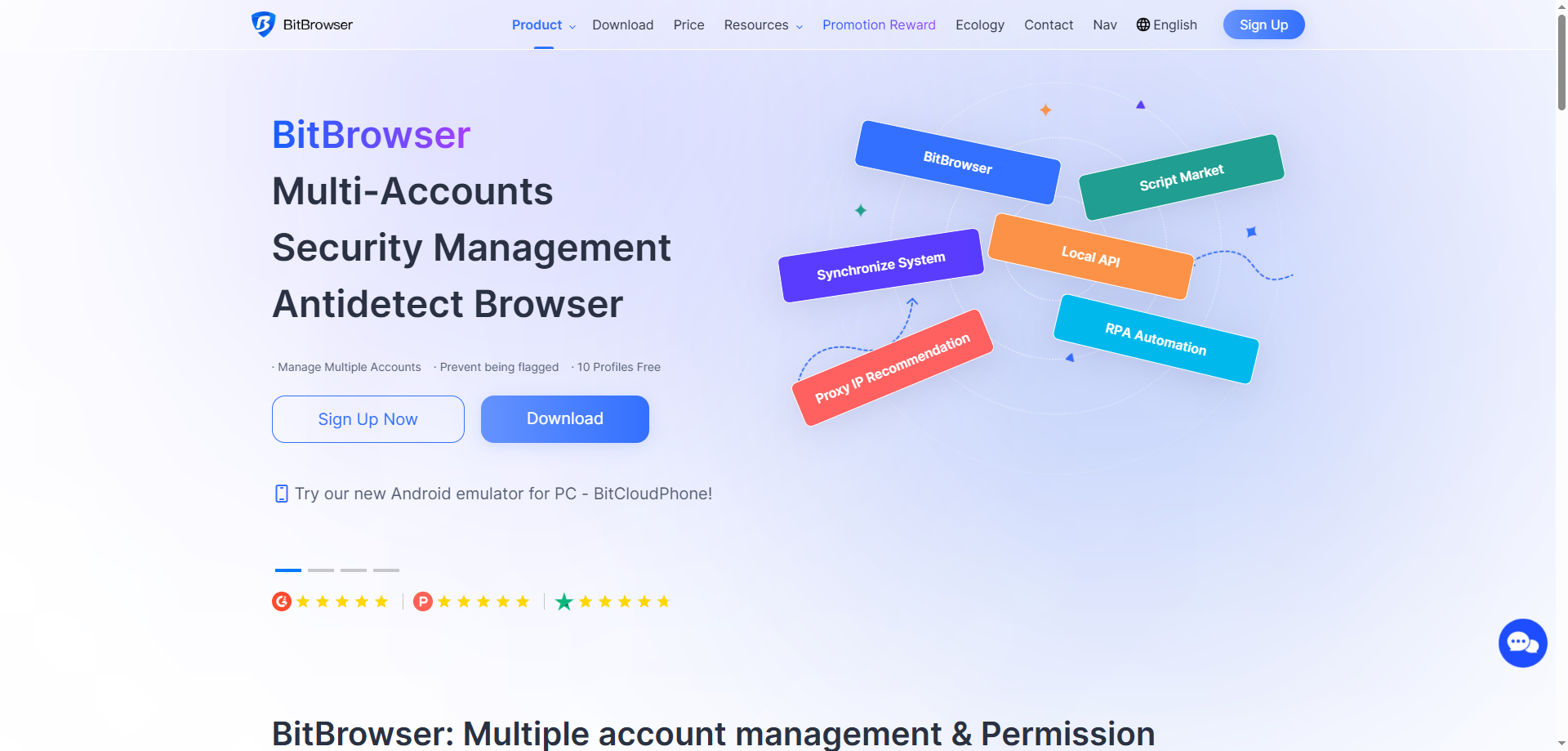
BitBrowser provides three levels of automation capabilities: Local API, Browser Window API, and RPA (Robotic Process Automation). It also supports a synchronizer (group control), which can synchronize mouse clicks and keyboard input in real time across multiple child windows while operating the main control window. This is suitable for scenarios involving batch execution of basic interactions. The RPA feature supports the graphical configuration of process-based operations, enabling the browser to automatically perform repetitive tasks such as batch browsing, liking, and form filling without requiring programming knowledge.
4. Team Collaboration and Permission Management
BitBrowser’s team management features support the creation of sub-accounts (employee accounts). The primary administrator can assign browser window access permissions by business line, while employees can only view and operate the environments they are authorized to access. Employee seats are included directly in the plans: the 50-window plan includes 2 employees, the 100-window plan includes 4, and the 200-window plan includes 8. The primary account can view operation logs, and viewing permissions can also be enabled for sub-accounts.
5. Bit Cloud Phone
Cloud phones are BitBrowser’s extended solution for mobile scenarios. The Bit Cloud Phone iOS version is based on real iPhone hardware. The official claim is that “it is identified as a genuine device by any software detection,” with a starting price of ¥180/month/device. This feature is primarily intended for operating platforms such as TikTok and Instagram that are sensitive to mobile environments, addressing the issue that PC-based emulators are easily detected.
3. Pricing Plans
BitBrowser’s current pricing structure, denominated in RMB, is as follows:
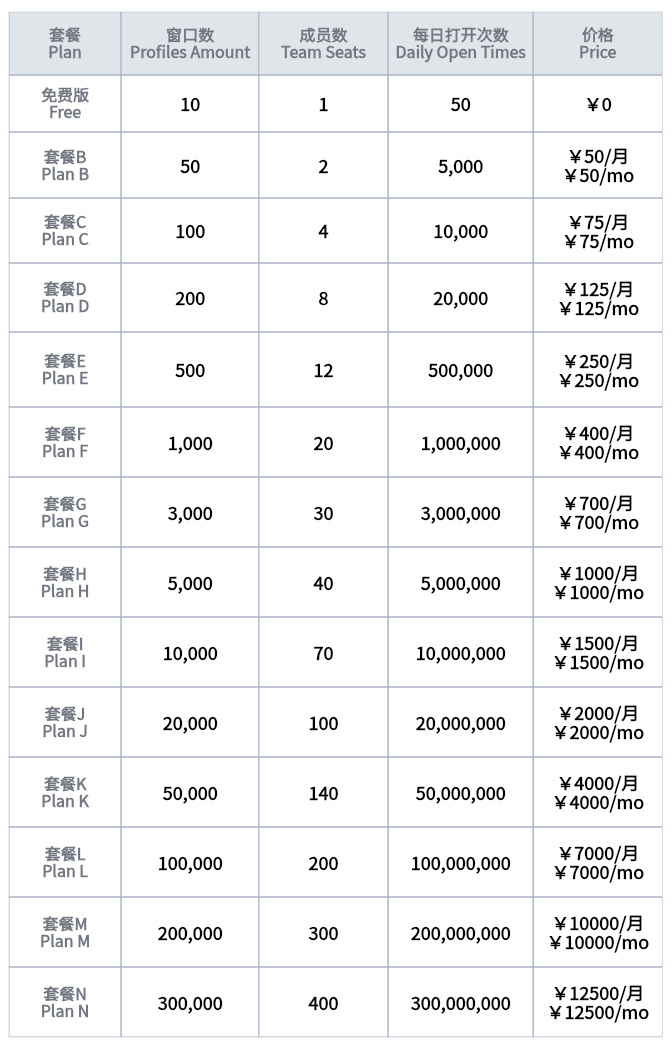
The free version provides 10 environments permanently free of charge and supports 1 sub-employee. Environments in the free version will not be automatically cleared by the system and can be restored after deletion. Paid plans offer additional discounts for annual subscriptions (30% off for annual payment and 40% off for two-year payment).
Cloud phones are billed separately, with the iOS version starting at ¥180/month/device. Cloud computers are billed by the hour starting at ¥0.12/hour, or by the month starting at ¥95/month. Hard drives and public IPs are charged separately.
4. Summary of Advantages and Disadvantages
Advantages
1. Industry-leading free allowance: Ten permanently free environments is currently the highest free allowance among mainstream anti-detect browsers, far exceeding AdsPower (2), Multilogin (5), and GoLogin (3).
2. Excellent cost-effectiveness: The 50-window plan costs only ¥50/month, equivalent to approximately $7/month, offering a significant price advantage among comparable products. Multilogin’s 50-window plan costs $29/month, while MoreLogin costs $25/30 days.
3. Chinese support and localized services: With a fully Chinese interface, Chinese-language customer service, and domestic payment methods, it has an extremely low learning barrier for users in China.
4. Clear plan structure: The number of windows directly corresponds to the number of employees, making it easy to estimate the budget when expanding a team.
5. Comprehensive automation features: RPA, APIs, and the synchronizer are all included, and the automation features are not charged separately as costly add-ons.
Disadvantages
1. Limited depth of fingerprint randomization: Multiple third-party users have reported that some fingerprint attributes of BitBrowser can still be identified on professional detection websites. Its multi-account stability also falls short of top-tier products such as Multilogin, creating a risk of “dead accounts.”
2. Security controversy: In July 2026, a user reported on a technical community that BitBrowser injected a suspicious program (clearRisk.exe) after installation, preventing other software from launching and prompting concerns about “supply chain poisoning.” Some users consequently requested refunds and uninstalled the software. Although this issue was not widely reported, it affected trust in the product.
3. Cloud phones require additional payment: Cloud phones cost ¥180/month per device, which is relatively expensive, and this cost is not included in the browser plans. The overall cost of mobile operations will therefore increase significantly.
V. Suitable User Groups
Suitable for:
-
Budget-conscious small and medium-sized sellers and individual entrepreneurs: The low entry barrier of 10 free environments + ¥50/month for 50 windows is suitable for zero-cost trial and error during the initial stage.
-
Small teams in China: The Chinese interface and documentation are user-friendly, and the plans include employee seats, making the product suitable for collaborative teams of 2–8 people.
-
Cross-border e-commerce operators managing multiple stores: Suitable for multi-account management scenarios on Amazon, independent websites, and other platforms, used together with their own proxy IPs.
-
Users who need RPA automation but have limited budgets: RPA features are included for free, with no additional purchase required.
Less suitable for:
-
Users with extremely high account security requirements: Insufficient fingerprint randomization depth and past security controversies represent potential risks.
-
Teams operating high-value TikTok account matrices: TikTok has extremely high requirements for mobile environments and fingerprint consistency. BitBrowser’s PC-based solution may not be robust enough and would need to be used with cloud phones, increasing costs.
-
Large enterprise-level teams: After exceeding 200 windows, users need to contact sales for a customized solution, and seat management is less flexible than Multilogin’s Business tier, which offers unlimited seats.
VI. Overall Evaluation
BitBrowser is a fingerprint browser with a precise market positioning and outstanding cost-effectiveness. It has made clear product trade-offs for the niche market of “small and medium-sized sellers and small teams in China”: at an extremely low free and paid price threshold, it provides sufficient environment isolation, proxy configuration, and automation capabilities. If you need to manage dozens of Amazon stores or social media accounts, have a limited budget, and do not require extreme fingerprint concealment, BitBrowser is a practical choice.
However, its shortcomings are equally clear. Its fingerprint randomization depth is at the mid-range level of the industry, and third-party reports of “dead accounts” indicate that it is not foolproof when dealing with platforms with strict risk-control systems. The security controversy in 2026 also reminds users that before placing important account assets in any tool, they should first thoroughly test the stability of the environment and remain attentive to the software’s update behavior.