
How to Safely Manage Multiple PayPal Accounts Without Getting Banned
PayPal is the world’s largest and longest-established online payment processing platform, processing trillions of dollars in transactions annually for more than 450 million users. As a core payment gateway for small and medium-sized businesses (SMBs) worldwide, PayPal has deployed extremely rigorous detection mechanisms to prevent fraud, money laundering, and platform abuse.
According to its official policies, PayPal does not allow multiple personal or business accounts to be opened under the same name or linked to the same bank account. If multiple PayPal accounts are operated on the same device without protective measures, all accounts face the risk of immediate suspension due to shared IP addresses and digital footprint tracking.
Whether you are an e-commerce entrepreneur running multiple Shopify stores or an agency managing finances on behalf of clients, this article will introduce the most reliable way to securely manage multiple PayPal accounts from a single device.

Differences Between Personal and Business Accounts
According to PayPal’s official User Agreement, an individual may hold no more than one personal account and one business account.
Personal account: Intended for individuals’ daily use, online shopping, and transfers between friends and family. It is registered under a real identity and is not suitable for handling high-volume commercial transactions.
Business account: Intended for merchants, e-commerce brands, and freelancers. It supports receiving payments under a company name, managing invoices, and integration with platforms such as Shopify, eBay, and Etsy.
For most ordinary sellers, the “one of each” rule is sufficient. However, for online businesses that need to scale, this policy creates a clear bottleneck. To diversify risk, industry professionals use “Stealth Accounts”—independent personal or entity profiles that appear completely unrelated to PayPal and originate from different locations.
How PayPal Tracks and Links Your Data
Before attempting to open a second account, it is important to understand how PayPal’s automated security system works. PayPal uses a highly sophisticated “Entity Linking” mechanism to associate multiple accounts with the same user.
Once Account A is restricted due to customer disputes, a surge in chargebacks, or policy violations, PayPal’s AI immediately traces the associations and imposes 180-day holds on Accounts B, C, and other linked accounts.
To link accounts, PayPal tracks far more than your legal name or bank account. It also scans your unique digital fingerprint, including:
Canvas and WebGL fingerprints: Hardware identifiers generated by the graphics processing unit (GPU).
Media device IDs: Unique handshake information from the speakers, cameras, and microphones connected to the system.
WebRTC leaks: Vulnerabilities that may expose your real residential IP address even when using a standard VPN.
Cookies and local storage: Residual browsing data from previous sessions that standard browsers cannot completely isolate.
Why a VPN Alone Is Not Enough
Many users mistakenly believe that enabling a VPN or using an “incognito window” is enough to operate multiple PayPal accounts. This is a costly misconception.
Standard VPNs rely on data center IP addresses, which are closely monitored by financial institutions and have already been blacklisted. Moreover, a VPN only changes your location; it cannot hide your browser fingerprint, such as your operating system, installed fonts, and screen resolution. PayPal’s system will immediately recognize that different accounts are being accessed from the same machine, triggering a “permanent limitation.”
How to Safely Set Up and Manage Multiple PayPal Accounts
To operate multiple accounts securely on a single device, complete technical and legal separation is essential.
Step 1: Ensure That Identity Information Is Independent
Each account should appear to belong to a completely different individual or business entity:
Separate email addresses and phone numbers: Never reuse contact information across accounts.
Different banking information: The same debit card, credit card, or bank account must not be linked to multiple PayPal accounts.
Unique tax IDs: U.S. business accounts must use different Employer Identification Numbers (EINs), rather than an individual Social Security Number (SSN), because PayPal strictly enforces its “one account per SSN” policy.
Step 2: Achieve Technical Isolation with an Antidetect Browser
Professionals do not use ordinary browsers. Instead, they use Antidetect Browsers to manage separate virtual environments. These browsers isolate each session in its own dedicated profile, ensuring that cookies, local storage, and hardware fingerprints do not contaminate one another.
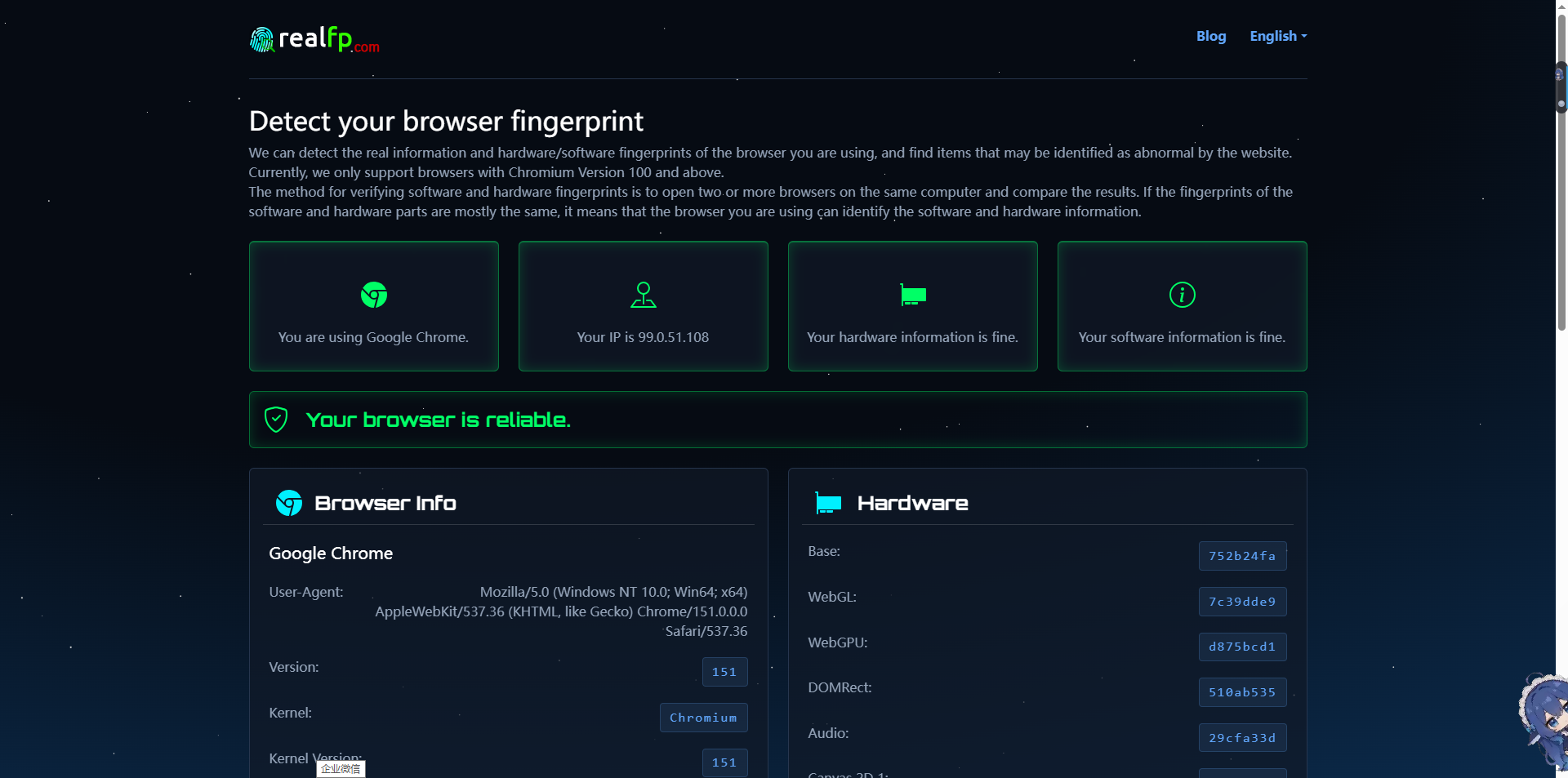
Pro tip: Before logging in to any PayPal account, always confirm that the virtual environment is genuinely secure and leak-free. It is recommended to use advanced fingerprint testing tools such as realfp to inspect the profile.
realfp analyzes browser profiles in depth, detecting issues such as WebRTC leaks, IP location mismatches, and hardware fingerprint inconsistencies. If realfp indicates a vulnerability, fix it before opening PayPal. The “health certificate” provided by realfp means that, in the eyes of PayPal’s AI, your profile resembles a real, independent machine.
Step 3: Pair It with High-Quality Residential Proxies
An antidetect browser can conceal hardware information, but a clean connection is equally essential. Each browser profile should be paired with a static residential proxy (ISP proxy), assigning each PayPal account an independent and highly trusted residential IP address while completely avoiding the blacklisted IPs commonly associated with standard VPNs.
"Invisible Account" Warm-Up Strategy
Creating an account is only the starting point. To avoid triggering PayPal’s security algorithms and manual fraud reviews, you need to simulate natural user behavior through a “warm-up” strategy:
Cookie Farming: Before visiting the PayPal registration page, spend several days visiting popular websites such as Amazon, eBay, and Wikipedia in that browser profile to build up a natural, trustworthy cookie history.
Gradual Expansion: Never process large transactions on a new account. Start with small amounts and gradually increase your sales volume.
Enable Two-Factor Authentication: Enabling two-factor authentication can significantly lower the account’s risk rating in PayPal’s automated systems.
Upload Shipping Tracking Promptly: Ship orders quickly and immediately upload the tracking number to PayPal to keep customer disputes and chargeback rates below 1%.
Conclusion
Managing multiple PayPal accounts on a single device is a high-risk operation, but with the right approach, it can be fully controlled. By separating documentation at the legal level and isolating browsing environments at the technical level with anti-detection technology, residential proxies, and auditing tools such as realfp, you can safely expand your online business without constantly worrying about sudden bans disrupting your operations.