
Kameleo Browser Comprehensive Review (2026)
I. Product Overview
Kameleo is a fingerprint browser developed by a Hungarian team, with Tamas Deak serving as CEO. Since its launch in 2017, it has focused on the anti-detect sector for nearly a decade. Compared with established competitors such as Multilogin, Kameleo has a highly distinctive positioning: its underlying architecture was designed with an “automation-first” approach from the outset, rather than merely serving manual multi-account management.
Kameleo does not rely on browsers installed locally by users. Instead, it comes with two proprietary browser engines: Chroma, based on Chromium, and Junglefox, based on Firefox. Each browser profile carries an independent fingerprint configuration covering dimensions such as User-Agent, screen resolution, time zone, language, WebGL parameters, and Canvas noise. Profiles can also be linked to proxies to automatically align time zones and geographic locations.
In 2026, Kameleo released version 5.0, whose core transformation was a complete shift toward the developer experience: email-and-password login was removed in favor of personal access tokens; users can now try the product without registering an account; the SDK includes a built-in engine readiness check; and the Junglefox–Playwright bridge is bundled directly into the SDK. These changes indicate that Kameleo is actively moving away from the red-ocean market of “manual multi-account management” and instead focusing on Web Scraping and automated testing scenarios.
II. Core Function Evaluation
1. Dual Browser Engines: Chroma + Junglefox
Kameleo’s dual-engine architecture is an important part of its technical foundation. Chroma is based on Chromium, while Junglefox is based on Firefox. Users can switch between browser fingerprint families within the same product without relying on locally installed versions of Chrome or Firefox. The significance of this design is that different anti-bot systems use different detection strategies for different browser engines, and the dual-engine setup provides the flexibility to “try a different fingerprint family.”
It is worth noting that Kameleo’s Chroma engine is updated at a rapid pace. The company claims that it follows up within five days of the release of an official Chrome version. For automation projects that rely on the latest browser features or need to avoid “outdated version” detection, this offers tangible value.
2. Automation Integration: Native Support for Selenium / Playwright / Puppeteer
This is Kameleo’s core competitive advantage. Kameleo is one of the earliest fingerprint browsers to expose a local WebSocket API while being compatible with all three major mainstream automation frameworks. Scripts connect to running browser profiles via CDP, and the operation is no different from connecting to a remote browser.
Version 5.0 further reduces integration friction: the SDK adds a verifyEngineReady() method to address the common issue of connection errors caused by scripts sending requests before the engine has finished starting; the Junglefox–Playwright bridge executable is bundled directly into the SDK, eliminating the need for manual locating and configuration. For developers whose primary working interface is code, these changes deliver a much greater practical improvement than the nominal number of fingerprint parameters.
3. Fingerprint Quality and Real-World Performance
The third-party evaluation organization The Web Scraping Club once benchmarked Kameleo using CreepJS and BrowserScan, giving it an initial score of 175/260 (compared with 226/260 for a real Mac device). However, the WebRTC leak identified during testing was confirmed by the Kameleo team to be a test configuration issue——WebRTC needs to be explicitly configured in the profile rather than enabled by default. With the correct configuration, the actual score should be higher than this figure.
This detail reveals an important characteristic of Kameleo: fingerprint quality depends heavily on configuration. The default settings are not optimal, and users need to understand parameters such as proxy alignment and WebRTC settings to fully leverage its capabilities. For automation teams willing to invest time in optimization, this is not a major issue; for manual multi-account users expecting a “ready-to-use” experience, however, it may present an obstacle.
Community feedback confirms this point. Some users have reported that Kameleo performs well on ordinary websites but may still be detected by strict detection systems used by banks or advertising platforms. Others have noted that its “setup is simpler than that of most anti-detect tools,” but that residential proxies are necessary to achieve stable results.
4. Accountless Mode and Developer-Friendly Design
The Accountless mode introduced in version 5.0 is a feature worth mentioning separately. Users can download and launch Kameleo without registering, and test whether the product suits their target scenarios within a 20-minute-per-month allowance. For cautious technical decision-makers, this is more convincing than any marketing copy.
III. Pricing Plans
Kameleo currently uses a pricing model based on the number of Concurrent Browsers. All plans include unlimited local profiles and core fingerprint features.
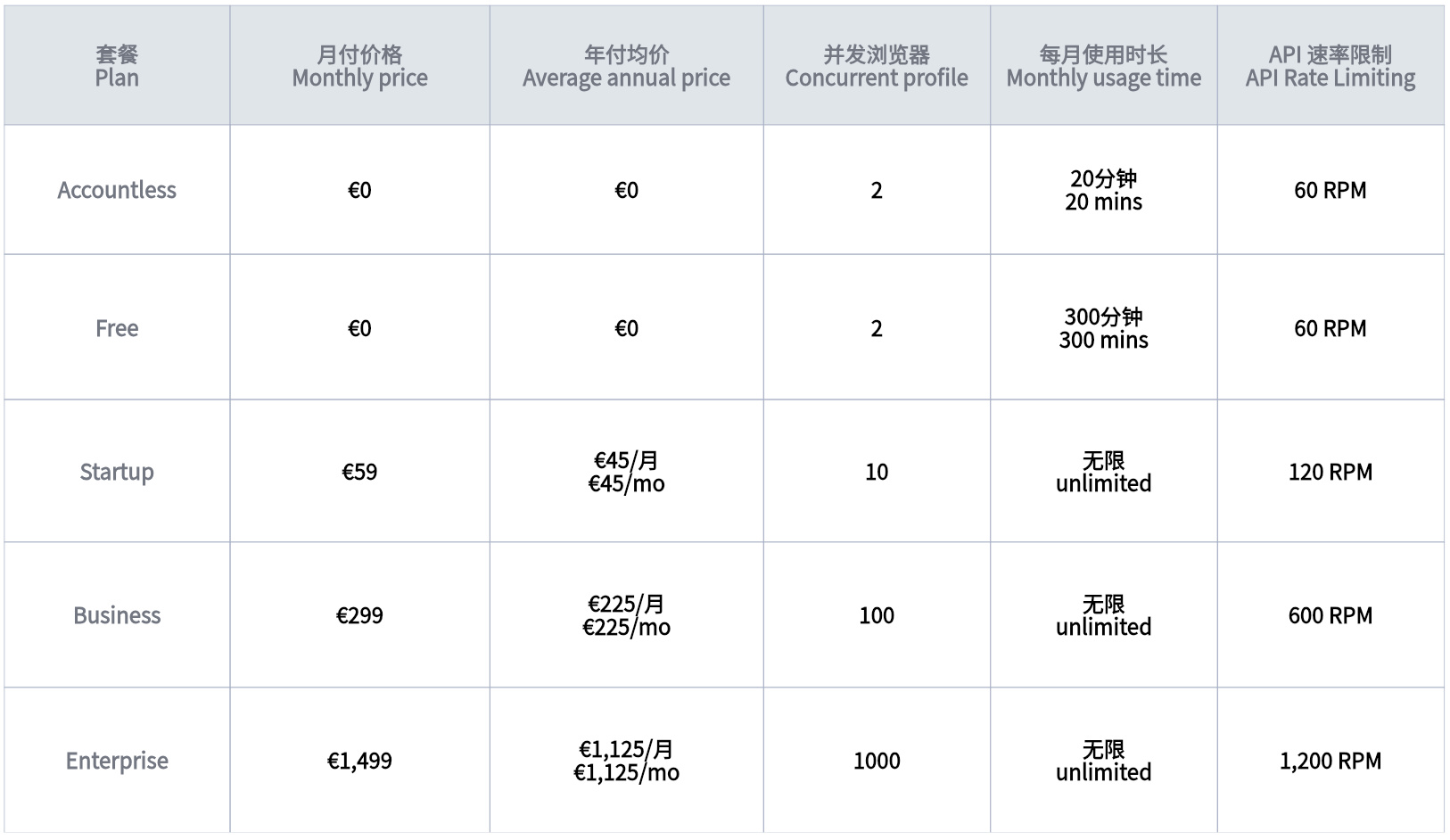
Key takeaway: The 300 minutes included in the Free plan represent the total runtime. Time starts counting as soon as a profile is opened, and the quota is consumed even when the profile is idle. This means the Free plan is suitable for feature validation but not for continuous operation. The Startup plan, priced at €59/month, unlocks unlimited runtime and 10 concurrent browsers, making it a reasonable starting point for automation projects. The main advantages of the Business plan and above are increased concurrency and API rate limits, making them suitable for large-scale Scraping deployments.
IV. Summary of Pros and Cons
✅ Pros
Industry-leading automation integration. It natively supports Selenium, Playwright, and Puppeteer, offers a stable and reliable local WebSocket API, and version 5.0 further eliminates integration friction. For scraping and QA automation teams, this is the primary reason to choose Kameleo.
Dual Engines Provide Flexibility. The combination of Chroma + Junglefox allows users to switch between Chromium and Firefox fingerprint families without requiring additional tools.
A Developer-First Product Evolution Direction. Accountless mode, PAT authentication, engine readiness checks, and built-in SDK bridging tools——these changes all point in the same direction: helping people who write code get to work faster.
The Free Plan Can Be Practically Tested. The Free plan provides 2 concurrent browsers and 300 minutes per month, which is sufficient to complete a full round of functional testing and fingerprint detection.
❌ Disadvantages
Fingerprint quality depends on configuration, and the defaults are not optimal. Key settings such as WebRTC need to be enabled manually, and the “failures” seen in third-party benchmarks often result from improper configuration. This is unfriendly to beginners and may also lead users to conclude that the “results are average” without adequately fine-tuning their setup.
Manual multi-account management is not its strong suit. Kameleo’s interface and feature design are clearly more developer-oriented, while its team collaboration features—such as granular permissions and activity auditing—are not as comprehensive as those of competitors like Multilogin. If the core requirement is “having multiple people manage a large number of social media accounts,” its team features should be carefully evaluated to determine whether they are sufficient.
Delayed macOS support. The Windows version came first, while macOS support was not added until May 2024, so feature parity may lag behind.
A weak Chinese-language ecosystem. The interface and documentation are primarily in English, and support for China’s proxy ecosystem and Chinese-language customer service is limited. Compared with localized products such as AdsPower and BitBrowser, the barrier to entry for Chinese-speaking users is significantly higher.
V. Suitable Users
✅ Highly Suitable:
-
Web Scraping developers: Those who need to integrate a fingerprint browser into an automated pipeline and control browser behavior through Playwright/Puppeteer. Kameleo’s API design and the developer experience improvements in version 5.0 directly serve this use case.
-
QA automation testing teams: Those who need to test the behavioral consistency of web applications in different browser fingerprint environments.
-
Budget-conscious technical individual developers: The Free plan and Accountless mode provide a zero-cost path for validation, while the Startup plan at €59/month is an acceptable investment for individuals or small teams with clear automation needs.
⚠️ Requires Careful Evaluation:
-
Teams managing multiple accounts manually: If the primary workflow involves manually switching between accounts and publishing content in browser windows, Kameleo’s automation advantages cannot be fully utilized, while its weaknesses in team collaboration and interface usability will become more apparent.
-
Beginners seeking a “ready-to-use” solution: Fingerprint configuration requires a certain learning curve, and performance with the default settings may fall short of expectations.
-
Teams primarily targeting the Chinese market: Chinese-language support and compatibility with the local proxy ecosystem are insufficient, requiring additional effort to address network and language issues.
❌ Not Particularly Suitable:
-
Individual users who only need basic privacy protection (a browser extension + VPN is sufficient).
-
Users with strict requirements for a Chinese-language interface and Chinese-language customer service.
VI. Overall Evaluation
Kameleo occupies a clear and difficult-to-replace niche in the fingerprint browser market in 2026: it is not the most “all-purpose” fingerprint browser, but it may be the most “developer-friendly” one.
Kameleo has taken a different path. Almost every change in version 5.0 conveys the same message: we care more about people who write scripts than people who click buttons. Accountless mode removes the registration barrier, PAT replaces passwords, engine readiness checks eliminate race conditions, and the Playwright bridge works out of the box——for developers who work with SDKs and APIs every day, the cumulative impact of these details creates a significant difference in experience.
In terms of fingerprint quality, Kameleo is capable of handling most scenarios when configured correctly, but the fact that the “defaults are not good enough” is an issue that needs to be addressed. If future versions provide smarter default configuration recommendations or a one-click optimization wizard, the gap between its actual performance and user expectations will be greatly reduced.